The first thing to know: your contacts are most likely still there. Nine times out of ten, they are simply hidden or have stopped syncing. I know this from our practice - we get such requests at Iclub Service several times a week, especially after major iOS updates.
The most common scenario: a person opens Messages, sees "+7 923 555…" instead of a name, and panics. In reality, the contacts from the Google account have simply been disabled. Or the iPhone has stopped showing one of the groups after an update.
First: check if all contact groups are turned on
Open "Phone" → "Contacts" → "Groups" (button in the top left corner). All connected accounts are visible there - iCloud, Google, Exchange, and others. Make sure each one is checked.
It sounds trivial, but it really saves the day. I saw a case with an iPhone 15 Pro where a person lost about 400 contacts. It turned out that after updating to iOS 17, the checkmark for the Google account had unchecked itself. We turned it on - everything came back.
Second: check account authorization
Go to "Settings" → "Contacts" → "Accounts". Look at each one - Gmail, Outlook, Exchange, work email. If it says "Account Not Authenticated" next to it - tap it and re-enter your password. This happens more often than people think, especially after changing a Google password or enabling two-factor authentication.
Third: restart iCloud syncing
If the contacts were supposed to be stored in iCloud: "Settings" → your name → iCloud → find "Contacts", turn the switch off. When prompted, select "Keep on My iPhone". Wait 15 seconds, turn it back on. The iPhone will start syncing again. Sometimes contacts return in a minute, sometimes you need to wait longer - it depends on the amount of data.
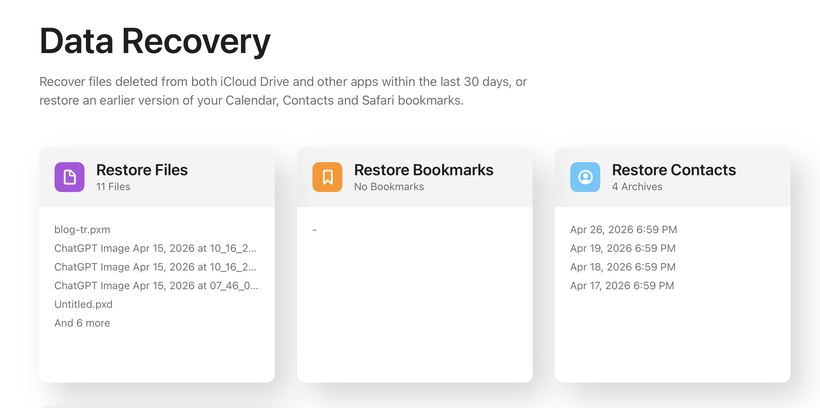
Fourth: iCloud archive - few people know about this 📋
Go to icloud.com from a computer → "Account Settings" → "Advanced" → "Restore Contacts". There will be archives for different dates - you can roll back to the point when the contacts were still there. Important note: restoration will replace current contacts with the archived ones. If you added someone new after they disappeared, export the current list via a third-party app first.
An unexpected observation from practice
A couple of times people came to us whose contacts "disappeared" after they accidentally signed out of their Apple ID. iCloud contacts disappear instantly in this case - and the person is sure they have lost everything forever. Sign back into your Apple ID - and everything returns in seconds. In a panic, no one thinks of this, but it's the first thing to check.
If nothing helped
Don't factory reset your iPhone in the hope that it will "help". This almost never solves the contact problem, but it adds a headache with restoring everything else. Try contacting Apple support via apple.com/support - they have access to the server side of the account, sometimes they help restore data directly. 📞
If you can't solve it on your own - come for diagnostics to Iclub Service, Novosibirsk, 35 Kommunisticheskaya St. We'll figure it out.