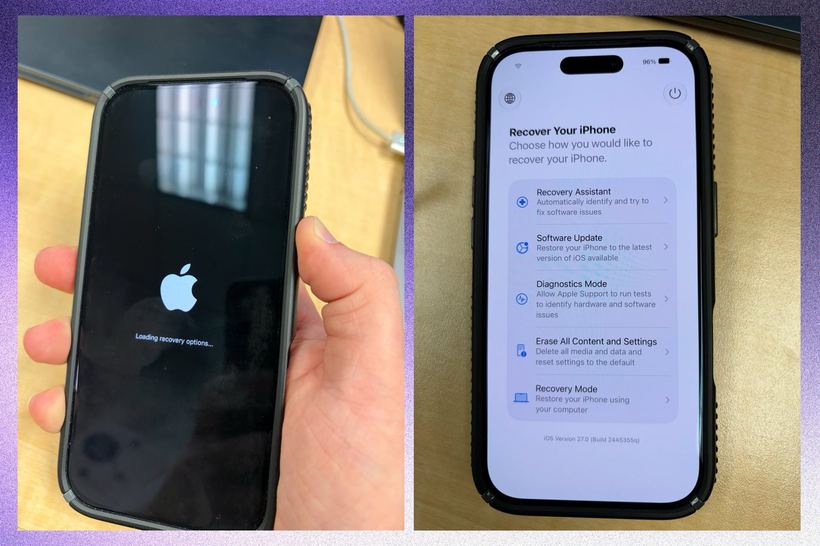
Previously, if an iPhone froze completely or the firmware crashed, you needed a Mac or at least a Windows PC with iTunes. People used to call us asking "is there any way to do it without a computer?" and we honestly said: no. iOS 27 changed that — and to be honest, it was about time.
Now the iPhone has a built-in full recovery mode — just like on a Mac. To access it, turn off the phone, press and hold the power button for a few seconds. The text "Loading recovery options" will appear under the Apple logo. As soon as the menu loads, let go.
What is inside
Five tools, each for a specific situation.
Recovery Assistant is a smart feature: it analyzes the system's state and suggests a specific fix. Not just "reinstall everything", but it tries to repair with minimal losses. If the issue is with the firmware, it often handles it without a full reset.
System Update — you can install iOS directly from here, even if the phone won't boot into normal mode. This is convenient when an iPhone gets stuck on the Apple logo after an update, a case we see about three times a week.
Diagnostic Mode. Now this is really interesting: you can check the screen, battery, camera, and sensors without booting the main system. For someone who wants to figure out what is happening with their phone, this is a real breakthrough. Diagnostics show data that wasn't publicly available before.
Erase All Content and Settings — a full reset without logging into iOS. If you forgot your password or the phone is locked, this is the way to go.
Recovery Mode via Mac — the classic option for really severe cases when nothing else helped.
An observation from practice that surprised me
During the first week after the release of iOS 27, several people came to us with iPhone 16 Pro models — they had restored the firmware themselves using the new mode and just came to make sure everything was alright. And everything actually was alright. Without us.
We usually start diagnostics with a conversation: how exactly the phone froze, what was being done before that. It turned out that about a third of clients who used to bring in an iPhone in a "dead" state can now solve the problem themselves — simply by updating or soft recovery without data loss. Previously, this was impossible without a computer. Countless people dragged their phones across the city for nothing. 🙌
When you still can't do without a service center
The new mode is great for firmware issues. But if after the recovery the phone freezes again, gets hot, doesn't hold a charge, or goes to a black screen, that's no longer firmware. That's hardware.
iPhone 14 and 15 are especially prone to power issues after incorrect updates — we see this several times a week. Power management IC, battery, sometimes the motherboard — that's soldering station work, not recovery mode. 🔧
Another useful point: diagnostics in iOS 27 show battery health in more detail than the standard settings screen — actual charge cycles and degradation are visible in numbers. Check it out before deciding whether to replace the battery or not.
Is it worth updating for this?
Yes, if you have an iPhone 12 or newer. Recovery mode is a really useful thing, especially when there is no computer at hand. Update through standard settings with a charge above 50% and stable Wi-Fi. Don't do it right before an important trip — Apple sometimes releases hotfixes right after a major release, it's better to wait a day or two. 📱
If you can't solve it on your own, come for diagnostics at iClub Service, Novosibirsk, 35 Kommunisticheskaya St. We'll sort it out.