iTunes is a powerful media player and content manager from Apple that also allows you to create and install custom ringtones on your iPhone. Creating a ringtone lets you set a unique ringtone for your phone and add a personal touch to your device. In this article, we'll show you how to create ringtones through iTunes for free.
Step 1: Choose a song
The first step is to select the song you'd like to use as a ringtone. Make sure this song is already added to your iTunes library.
Step 2: Open iTunes and select the song
Open iTunes on your computer and find the song in your library. Right-click on the song and select "Song Info" (or "Get Info").
Step 3: Set time markers
In the "Song Info" window that opens, go to the "Options" tab. Here you can set the start and end time markers for your ringtone. It's usually recommended to choose a segment of the song no longer than 30 seconds.
Step 4: Create a ringtone copy
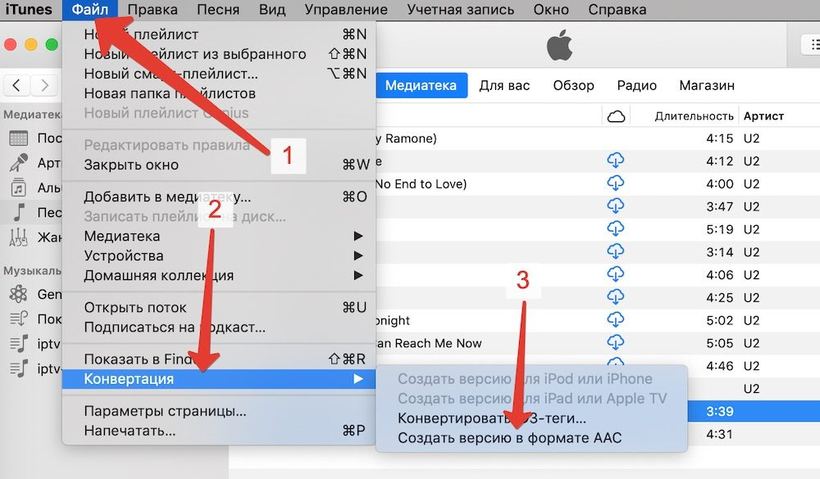
Right-click on the song and select "Create AAC Version." iTunes will create a copy of the song with the specified time markers.
Step 5: Find the ringtone file
Locate the created copy of the song in your iTunes library. It will usually appear next to the original song and have the same name, but with a shorter duration.
Step 6: Change the file extension
Change the ringtone file extension from ".m4a" to ".m4r." You can do this by right-clicking on the ringtone file, selecting "Rename," and replacing the extension.
Step 7: Add the ringtone to iTunes
After changing the file extension, drag the ringtone back into your iTunes library. The ringtone
will be added to the "Tones" section in your library.
Step 8: Sync the ringtone with your iPhone
Connect your iPhone to your computer and sync it with iTunes. Make sure that in the "Tones" section on your device's page in iTunes, the checkbox next to the ringtone is enabled to include it in the sync.
Step 9: Set the ringtone on your iPhone
After syncing, open Settings on your iPhone, go to the "Sounds" section, and select your new ringtone from the list of available sounds. Now your new ringtone should be installed and ready to use.
Now you know how to create ringtones through iTunes for free. By following these simple steps, you can set up your own unique ringtones for your iPhone and add some individuality to your device. Enjoy your personalized ringtones!